 PPTF
PPTFMatch-Trader in prop programmes
Match Trader for prop is one of the most common engines at forex programmes. We work out what the firm gets in the bundle, why such programmes show the limits right in the client area and where the environment reaches its ceiling.
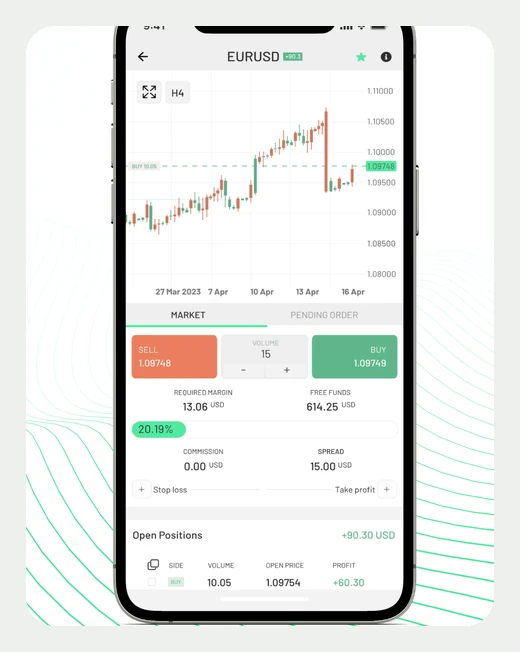
Match Trader prop firms: why this engine turns up so often
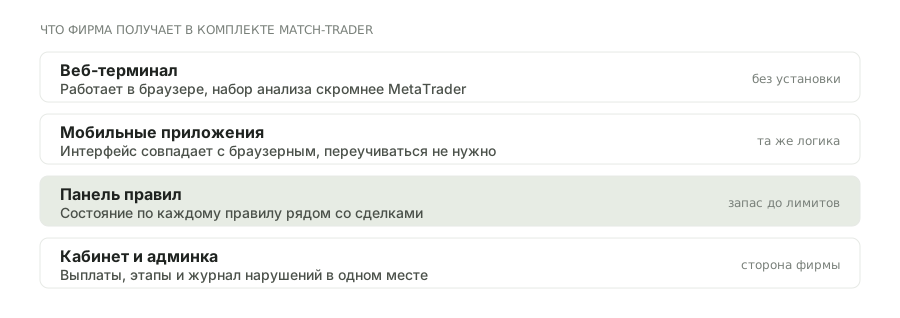
Match-Trade Technologies sells a firm not a platform but a set: a web terminal, mobile apps, a trader's client area, a rules panel and an admin console. Launching a programme on such a bundle is faster and cheaper than assembling infrastructure around MetaTrader — hence how widespread it is.
The trader notices it from day one. The client area usually shows the state of every rule at once: how much is left to the daily limit, how much to the maximum, how many trading days have been counted. There is no need to work out the cushion in your head in the middle of a streak — and that is exactly the moment when people get it wrong.
- The rules panel
- The state of every limit in the client area, next to the trades. That is not a requirement of the rules but a property of the bundle — MetaTrader has nothing like it.
- Its own web terminal
- It runs in the browser, with no installation. The analysis toolset is more modest than MetaTrader's, but sufficient for discretionary trading.
- Mobile apps
- They come in the same bundle, so the interface and the logic match the browser version — nothing to relearn.
Where the environment reaches its ceiling
The limits are exactly those that follow from a ready-made bundle: the feature set is defined by the vendor, not by your firm.
What to clarify in a programme on Match-Trader
The rules panel shows what the firm put into it — and that is the main source of misunderstandings.
The panel shows a number but does not always say whether it is from balance or equity, and from the start of the day or from the peak. The rules put it more precisely.
ask in writingIf the limit is measured from equity, an open position already reduces the cushion. The panel, meanwhile, may update with a lag.
test it on demoThe moment is set by the firm's server time. It is usually stated in the client area, but it is worth checking against the rules: a discrepancy costs an account.
minutesSome programmes on this engine close positions automatically, others simply block trading. The difference matters: in the first case the loss is realised at market.
find out in advanceWhat the panel tells you and what it keeps quiet about
The counter in the client area saves accounts, but it does not answer every question. Below: what it shows at once, what is missing from it and where to look for that.
| Question | Is it in the panel | Where the answer is more precise |
|---|---|---|
| How much is left to the daily limit | yes, as a number | the same ruling |
| What base it is measured from | usually not | the rules, section on limits |
| Whether the floating loss is included | not always, and with a lag | test it on demo |
| How many days have been counted | yes | the same ruling |
| What happens on a breach | no | the rules, or support in writing |
| What size is allowed for your stop | no | the calculation in the lot calculator |
A practical rule: the panel is an indicator, not a source of rules. A decision about a breach is made from the text of the terms, and if the counter diverges from them, what the terms say is what counts.
Frequently asked questions
What is Match Trader in prop trading?
A ready-made bundle from Match-Trade Technologies: a web terminal, mobile apps, a client area and a rules panel. A firm takes it whole, which makes launching a programme cheaper than assembling one around MetaTrader.
Why do programmes on this engine show the limits?
Because the rules panel comes in the bundle. It is a property of the infrastructure, not a regulator's requirement and not an industry standard: MetaTrader has no such panel.
Can the counter in the client area be trusted?
As a guide, yes; as the final word, no. It shows the base the firm has set and updates with a lag; a decision about a breach is made from the rules, not from your screen.
Do advisors run on Match-Trader?
MetaTrader code does not. The platform has no full environment for algorithms, so automated strategies stay either on MetaTrader or on an external interface, if the firm opens one.
How is the terminal worse than MetaTrader?
In the analysis toolset: fewer indicators and drawing objects, simpler templates. For marking up levels and trading by hand it is enough.
Is there a mobile app?
There is, from the same bundle, so the interface matches the browser version. That is convenient: one logic across all devices.
What happens when a limit is breached?
It depends on the firm's configuration: some programmes close positions automatically, others block trading and leave the closing to you. The difference changes the actual loss, so it is worth finding out in advance.
Where in the client area is the stage report?
In the reports section next to the account statistics — the same place as the rules panel. Download it after every stage: once the account is closed, access to the client area is not guaranteed, and the export goes with it.
Does execution differ from MetaTrader?
It can, because quotes and the execution model are set by the provider rather than by the interface. A fair comparison uses one instrument at one and the same time.
Who does this environment suit?
People who trade by hand and want to see the cushion to the limits next to their trades. For anyone with an automated MQL strategy it is the opposite of convenient.
Read next
