 PPTF
PPTFMT5 in prop trading: the terminal and the prop account
MT5 in prop trading is the most common option: almost every programme has the terminal. What we work through is not the interface but what a prop account needs: reviewing the history for a dispute with the firm, the account settings and sizing.
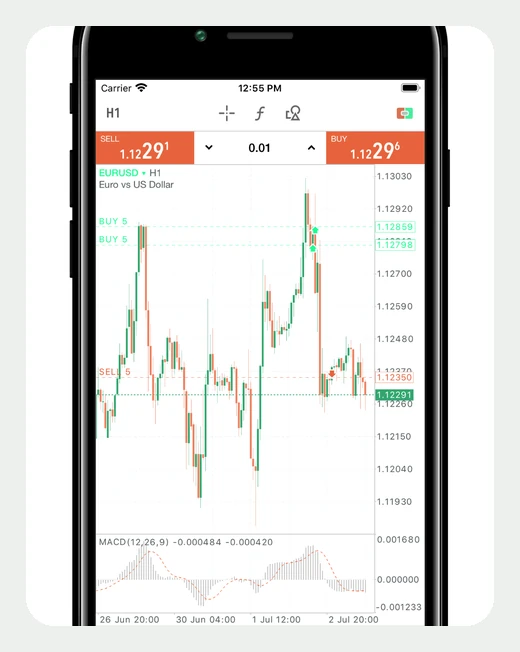
Why MT5 became the standard of the prop industry
Not because of the charts. The reason is that MT5 solves three problems a prop programme inevitably faces: connection to any liquidity provider, a ready library of algorithms, and a detailed history for reviewing disputed cases.
The last is underrated until you run into it. When a firm closes an account for a breach, the only evidence is the export. In MT5 position history is separated from trade history, so you can see the moment of entry, every partial close and the fill price of the stop. Web terminals on the engines usually have no such detail.
- Positions and trades kept apart
- One position can consist of a dozen trades. The report shows both, so an argument about exactly when a limit was breached is settled by the export rather than by correspondence.
- Exporting the report to a file
- The account report is saved whole, with balance, equity and drawdown by day. That is the document worth keeping after every stage.
- A library of algorithms
- The largest among the platforms of the prop industry. For a firm that is an argument: a trader does not have to rewrite a strategy for its environment, which is why a MetaTrader 5 prop firm is almost always what you get.
MT5 prop accounts: what to check before the first trade
Four settings that are made on the firm's side and change either the sizing or the moment a limit triggers. All four are visible in the terminal.
| What to look at | Where in MT5 | Why it matters |
|---|---|---|
| Hedging or netting | account properties in the journal | with netting, opposing trades merge into one position |
| Server time | the time of the last quote | the daily limit resets on it, not on your clock |
| Symbol specification | right-click the instrument | pip value, contract size, swap, minimum lot |
| Stop levels | the same place, the stops level field | if the stop is closer than the minimum level, the order is rejected |
The non-obvious part about netting. On a netting account you cannot hold a buy and a sell in the same instrument at once: the second trade closes the first. Strategies that lock positions behave differently there than in the test — and that is not a ban by the firm but a property of the account.
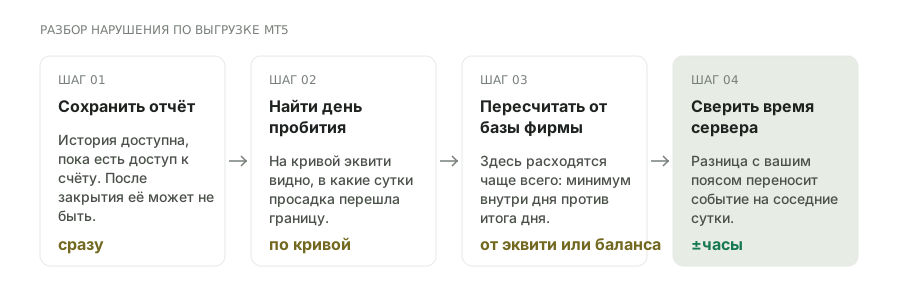
How to review your own breach from an export
An order of operations worth knowing in advance: once an account is closed, access to the history sometimes disappears with it.
Right-click in the account history and save as a report. The file will keep the trades, the positions and the equity curve by day — everything a screenshot lacks.
first of allThe equity curve shows on which day the drawdown crossed the boundary. Compare it with the firm's limit base: from balance or from equity.
from the curveIf the limit is measured from equity, take the intraday equity low rather than the day's close. That is where the discrepancy most often is.
the main mistakeThe moment of the breach is stated in server time. The difference from your time zone can move the event to the neighbouring day.
check without failFrequently asked questions
How is MT5 better than MT4 for a prop account?
In reviewing history and in the arithmetic. In MT5 positions and trades are stored separately, there is a report export with an equity curve by day, and a partial close is an operation — all of which is needed when a firm closes an account and you have to work out why.
Does MT5 affect a prop firm's rules?
No. The limits are computed by the firm's engine, and the terminal only displays trades. The same MT5 at two programmes does not mean the same drawdown bases.
How do I find out whether my account is hedging or netting?
In the terminal journal on connection, or in the account properties. On a netting account a simultaneous buy and sell in the same instrument is impossible: the second trade reduces or reverses the position.
Why will a stop not sit right next to the price?
Because of the minimum stops level in the symbol specification: closer than that distance the server rejects the order. On prop accounts the value is sometimes larger than a broker's.
Will the history survive if the firm closes the account?
Not necessarily: access to the client area and the server can disappear. Export the report after every stage and keep it yourself.
Does MT5 compute drawdown the way the firm does?
No, and that is a frequent source of misunderstanding. The terminal shows drawdown by its own method, while the firm counts from its own base — from balance or equity, from the start or from the peak. Check against the rules.
Can a prop account be traded from a phone?
Technically yes, mobile MT5 is fully functional. But moving a stop and closing part of a position are slower there, and on a prop account the price of a delay is a breached limit.
Does a prop account in MT5 need a VPS?
Only for advisors: they run while the terminal is on. Discretionary trading needs no VPS, but a stable connection matters — a dropout during a run of stops costs more than the subscription.
Does the pip value in MT5 differ from the calculated one?
For pairs quoted in dollars, no — there it is $10 per standard lot. For USD/JPY, metals and indices the figure is derived from the contract size and the rate, and taking $10 out of habit is wrong.
Where do I see which engine sits behind MT5 at a firm?
In the server name on connection and in the programme's terms. The terminal is one and the same, while the engine and the liquidity provider differ between firms — and the spread and execution model depend on them.
Read next
